How to Print a Perler Bead Pattern: A4 Sheet with Codes & Bead List
Print any fuse bead pattern as an A4 build sheet: grid lines, axes, in-cell color codes and a bead list, with brand palettes and no login required.
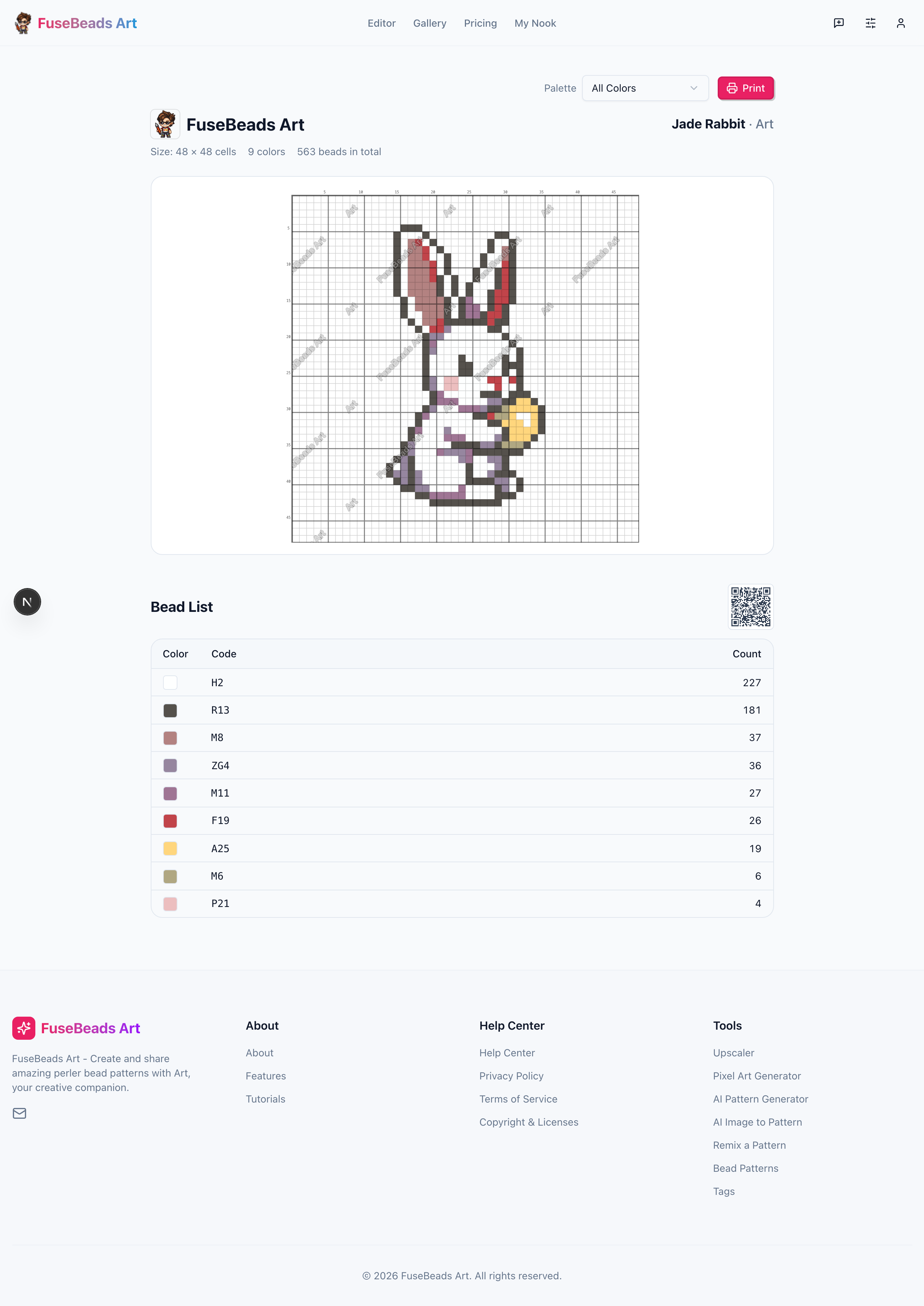
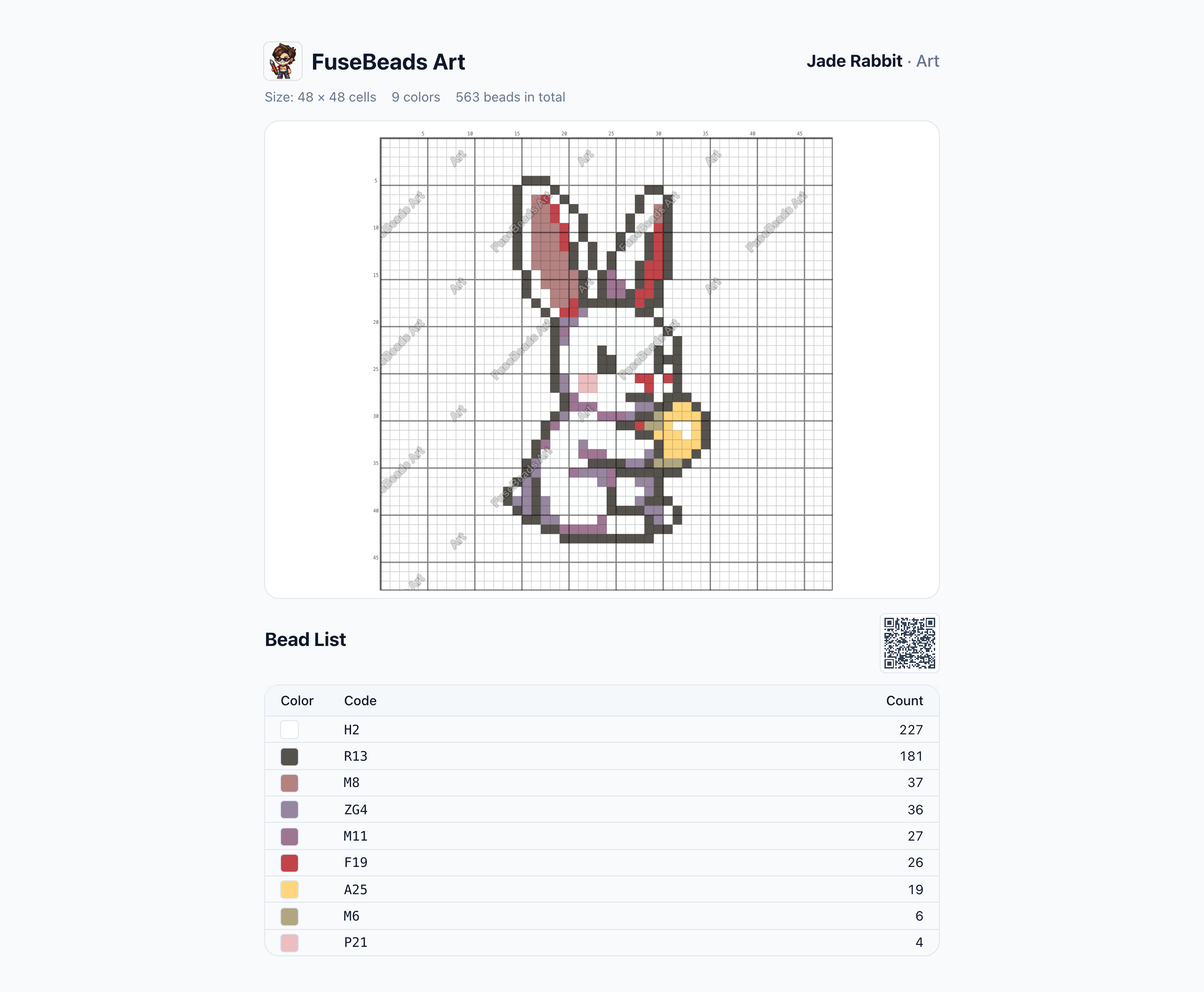
The worst part of beading from a screen: constantly zooming, scrolling and losing your row. The print view turns a pattern into asingle A4 build sheet — grid lines, axes, in-cell codes and a bead list, laid out and ready for the table.
Open the pattern page
Open any public pattern from the gallery or a profile. Only public patterns can be printed — private ones have no print entry.
Hit “Print this pattern”
The print button in the pattern header opens the print view directly: no login, no setup, works on mobile browsers too.
Pick a palette
Switch to the bead brand you actually bought. Grid colors are remapped automatically and the printed codes become that brand's color codes.
Print from the browser
Press the on-page print button (or Ctrl/Cmd+P): A4 portrait, keep the default margins, and enable “background graphics”.
Build from paper
The sheet carries row/column axes, in-cell color codes and a bead list: prepare beads from the list, then place them region by region — no screen needed.
Pick a pattern and try printing it
Public patterns print without login, even from a phone
What’s on the Sheet
One A4 page, four blocks — each solves a real problem:
| Block | Content | Problem it solves |
|---|---|---|
| Header | Site name + pattern name · author + meta | Tells your sheets apart once you print several |
| Grid sheet | Grid lines + row/column axes + in-cell codes | Locate by coordinates instead of counting cells |
| Bead list | Color, code and count columns | Prepare beads before you start; track leftovers while beading |
| QR code | Scan to return to the pattern page | Anyone holding the sheet can find the original |
Palettes: Print for the Beads You Actually Bought
Pattern colors don’t always match your stash: conversion uses the standard palette, but your beads may be another brand. That’s what thepalette selector in the print view is for: switch to a built-in brand palette or open the page with your own color list, and the grid is remapped by Lab distance while the codes print in that brand’s numbering — buy, sort and place straight from the sheet, no conversion table.
Printer Settings That Matter
- A4 portrait; the page carries its own margins, so keep “default margins” in the print dialog
- Enable “background graphics”, or the grid shading and cells may not print
- Color printing is recommended; in a pinch, grayscale still works via coordinates plus the bead list
- Check the preview for the full bead list — a long list flows onto the next page by design
Large Patterns
In-cell codes adapt to paper density: the font fills each cell while cells are big enough, and codes are omitted automatically below a readability floor. For large patterns the workflow iscoordinates + bead list: locate regions by row/column, verify each color against the list. The grid area has a height cap, so a long list flows to a second page instead of squeezing the grid.
Classrooms & Kids
Paper sheets shine in group settings: print one per child, bead by coordinates, and the teacher preps materials from the list. Combined with the classroom tips in ourperler beads for kids guide, a 40-minute session plans itself.
No pattern yet? Turn a photo into one first with thephoto to perler bead pattern tutorial, then print the sheet.
FAQ
No pattern yet? Draw one first
Free export from the editor, one-click printing from the pattern page